e-Box consultation with a Service Provider
Becoming a Service Provider Consultation
A Service Provider Consultation is a technical intermediary that will be able to consult e-Box Enterprise via a technical interface (RESTful webservice), on behalf of a Document Consumer, based on a mandate concluded by both parties.
In order to become a Service Provider for e-Box Enterprise, several steps are required:
1) Register as a "Service Provider" (FR: "Prestataire de services" ; NL: "Dienstverlener") in the Mahis application.
-
Link to Mahis:
-
Documentation and conditions to be respected:
- FR: https://www.socialsecurity.be/site_fr/employer/applics/mahis/general/identify_employer_as_payroll_service.htm
- NL: https://www.socialsecurity.be/site_nl/employer/applics/mahis/general/identify_employer_as_payroll_service.htm
- Summary of conditions
- Attention, this first step needs to be done by a Legal Representative of your organization.
- 🛈 You can consult CBE-public-search to know who are the Legal Representatives for your enterprise.
- The first login to Mahis has to be done as an employer (FR: "Employeur ONSS"; NL: "Werkgever RSZ") or enterprise without staff (FR: "Entreprise sans personnel"; NL: "Onderneming zonder personeel").
- The CBE number must be active and your enterprise has no debts to a public institution.
- The e-Box of your enterprise must have been consulted at least once;
- Note that the "Service provider" quality (FR: "Prestataire de services"; NL: "Dienstverlener") must not already exist (even 'blocked') in the system for your CBE number.
- Attention, this first step needs to be done by a Legal Representative of your organization.
2) Approve the e-Box terms and conditions for a Service Provider (in the Mahis application).
- As a Service Provider for e-Box Enterprise, you need to approve and respect the following conditions of use:
- In the identification request, check the box for approving the conditions of use as an e-Box Service Provider;
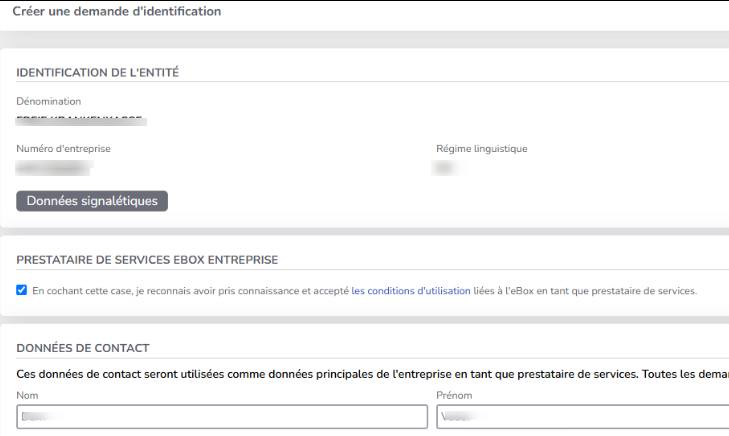
- If your enterprise is already registered as a "Service Provider" in Mahis, the checkbox for approving the e-Box Service Provider conditions is available on the following page:
- FR: Application Mahis → Menu "Mandataires" → "Gérer mes données"
- NL: Toepassing Mahis → Menu "Mandatarissen" → "Mijn gegevens beheren"
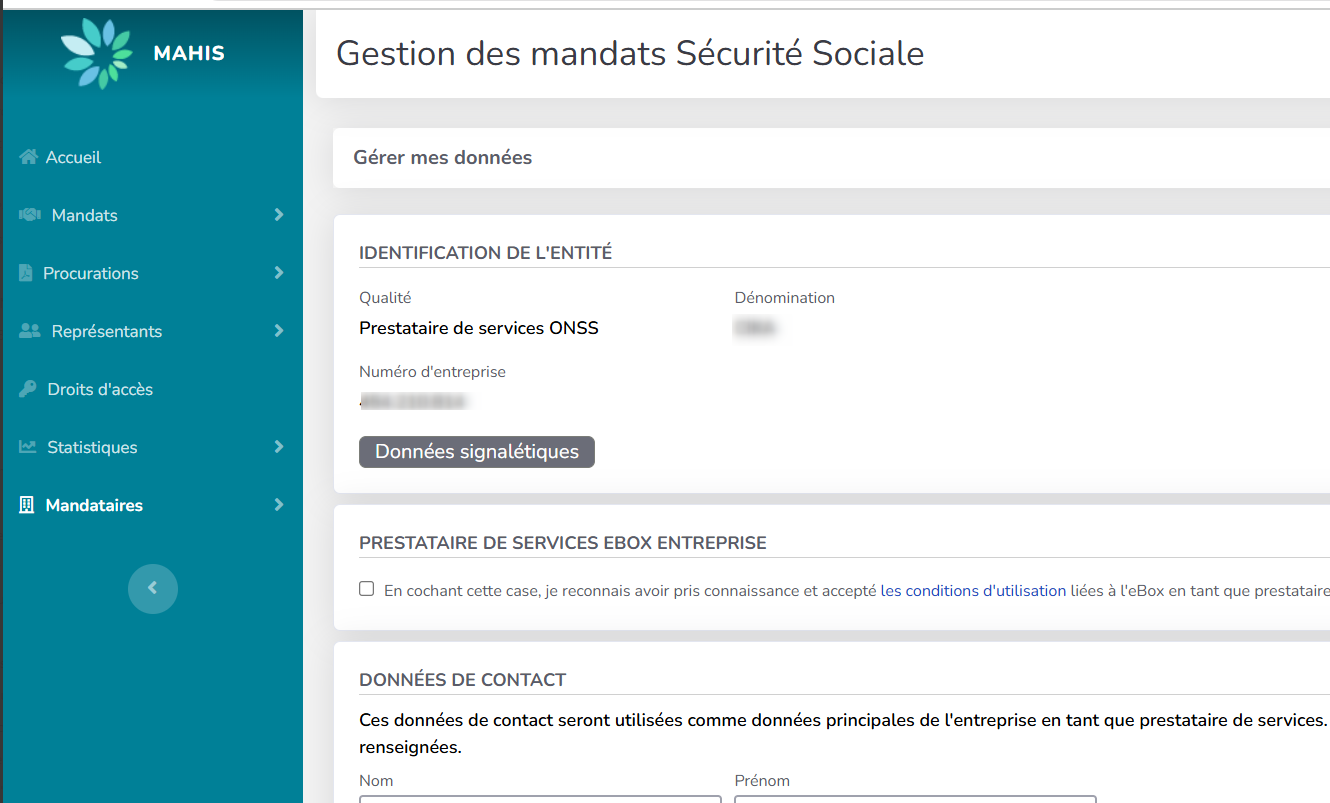
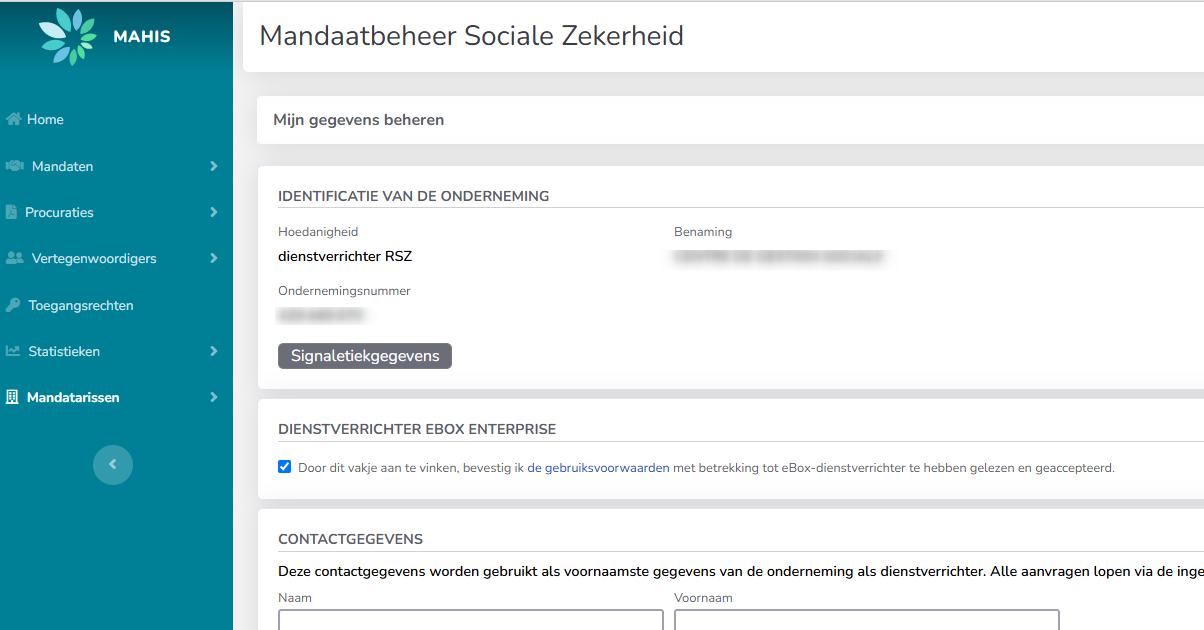
- Attention, only a Legal Representative of your enterprise is authorized to approve these e-Box Service Provider conditions.
- 🛈 You can consult CBE-public-search to know who are the Legal Representatives for your enterprise.
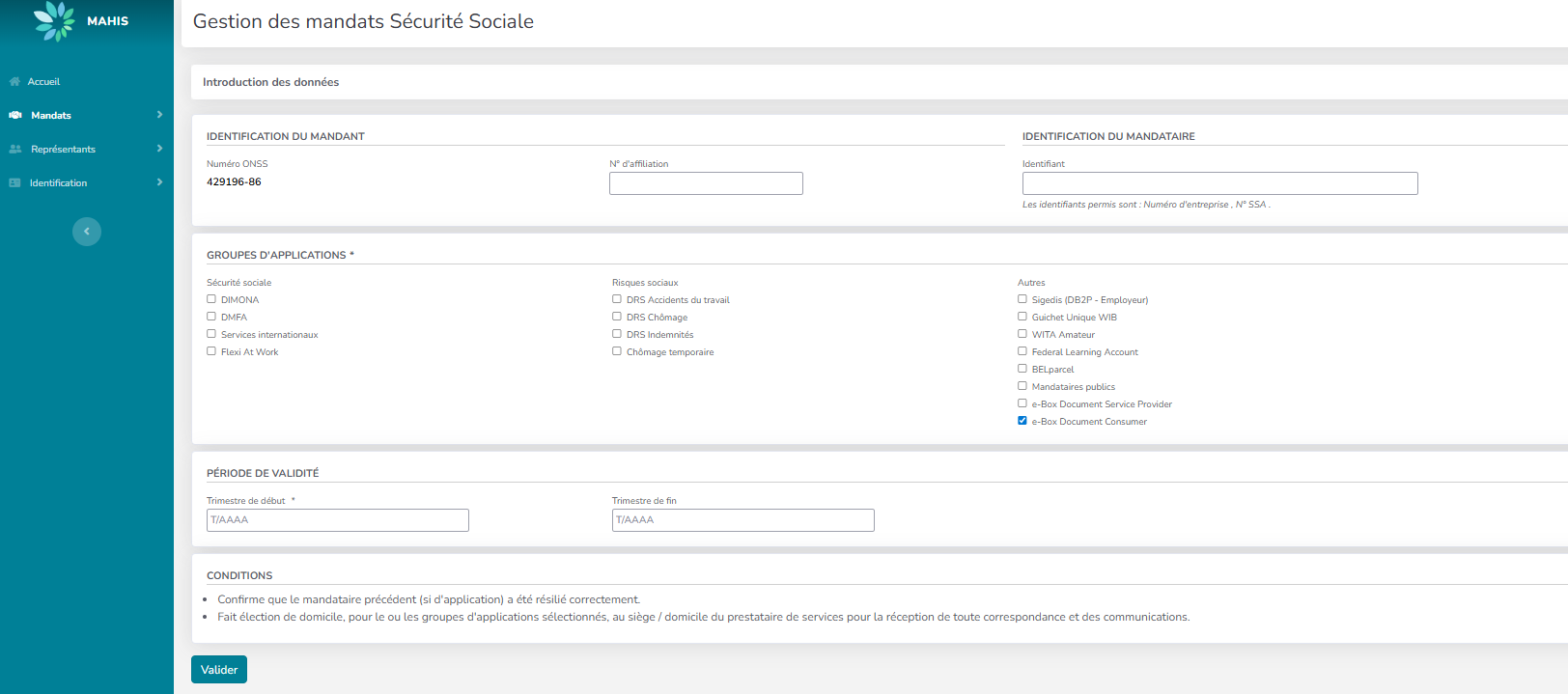
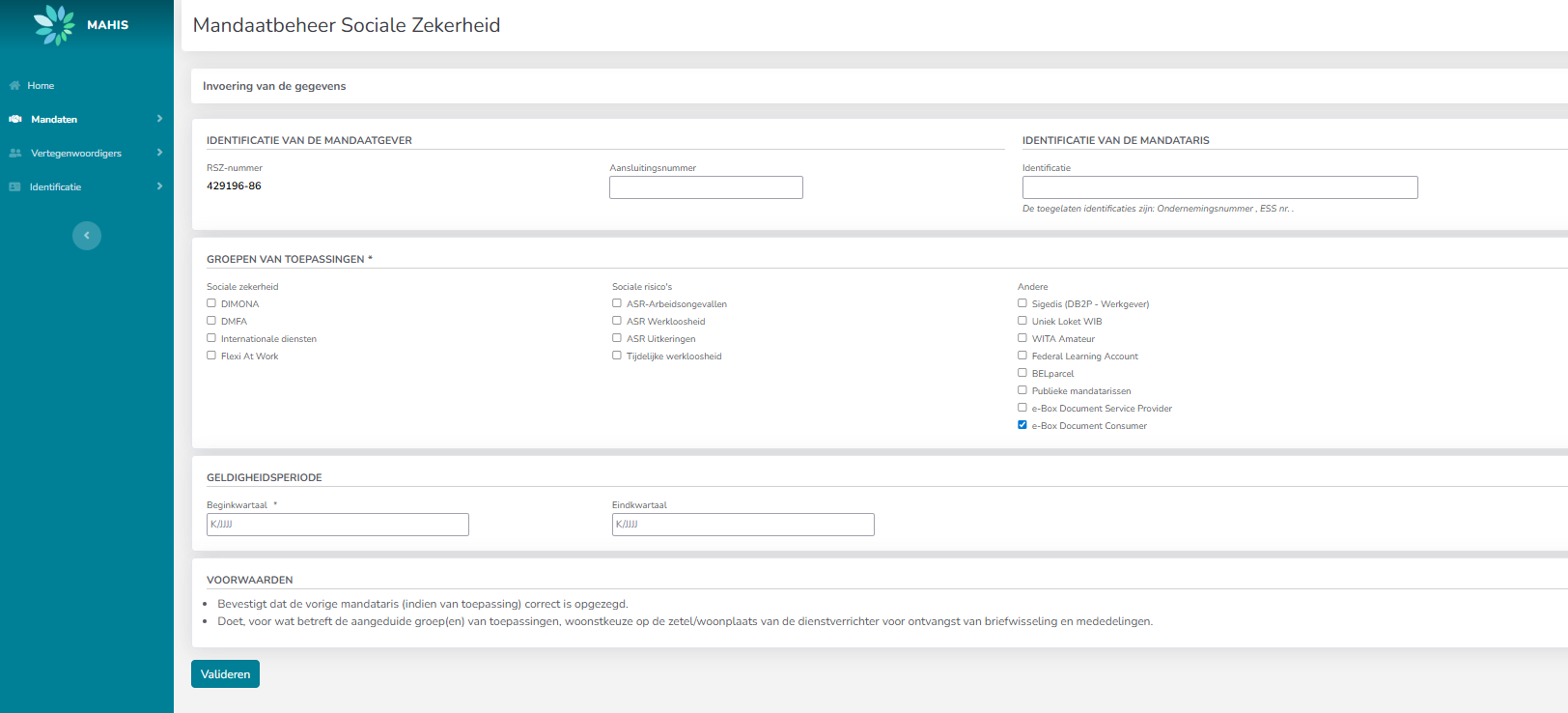
3) Create a new "e-Box Document Consumer" mandate in the Mahis application.
- FR: application Mahis, menu "Mandats" → "Créer"
- NL: toepassing Mahis, menu "Mandaten" → "Creëren"
- Do not forget to:
- Specify the enterprise number of the Document Consumer on behalf of which you will manage its e-Box consultations
- Select "e-Box Document Consumer" in the group of applications.
- Validate.
- ⚠ The e-Box mandate will only be usable when the Document Consumer will also validate it (see "What still need to be done as a Document Consumer working with a Service Provider ?").
- Do not forget to:
4) Create your OAuth client-id in the Chaman application.
- As a service provider, connect to the Chaman application
- FR: https://www.socialsecurity.be/site_fr/employer/applics/chaman/index.htm
- NL: https://www.socialsecurity.be/site_nl/employer/applics/chaman/index.htm
- Conditions for using Chaman:
- For the "Service provider" quality (FR: "Prestataire de services"; NL: "Dienstverlener") , you must be "Access manager" or you must have the following permission in your profile: FR: "ChaMan - Gestion des canaux techniques" ; NL: "ChaMan - Technisch kanaalbeheer"
- In Chaman, create or edit your "WebService account", and select the "REST" category.
- In your REST-account, you have to select the "e-Box service provider consultation" permission;
- You have to register the public part of your X.509 certificate.
- see following documentation about the certificate specifications : https://dev.eboxenterprise.be/docs/common/x509_certificate
- Your OAuth client-id will be generated automatically and will be displayed in the Chaman app.
- Chaman user guide:
- FR: https://www.socialsecurity.be/site_fr/employer/applics/chaman/documents/pdf/manuel_chaman.pdf
- NL: https://www.socialsecurity.be/site_nl/employer/applics/chaman/documents/pdf/handleiding_chaman.pdf
5) Request your OAuth Token
Using your OAuth client-id and X.509 certificate, you can now request an OAuth Token using the Authorization Server of Social Security.
- see documentation https://dev.eboxenterprise.be/docs/dc/onboarding_process/#22-retrieving-the-oauth-accesstoken-via-postman
- ⚠ There is a difference with the scope to request, between a Document Consumer and a Service Provider Consultation. As a Service Provider Consultation, you need to request the following scope: scope:document:management:ws-eboxrestentreprise:eboxrepresentativeconsultation
6) Testing in the SIM environment
Once you have obtained your token, for security reasons, you can do some testings with the Simulation URLs before consulting your messages in Production. Here's the list of APIs that you can access to with the OAuth Token:
- e-Box Provider Registry API
- In the results you can get the URL of Document Provider in SIM that you can consult for getting the messages.
- e-Box Message Registry API
- In this API you can find the different operations that you can do on messages in e-Box Enterprise (consultation of a document, reply to a message, etc).
- Don't forget to specify the BCE number of the Document Consumer on behalf of which you will consult the messages by adding the header 'On-Behalf-Of-Enterprise-Number' for your calls. (see OpenAPI).
- e-Box Partition API
- This API allows you to see the list of partitions that an e-Box has. It would be useful if you want to move a message to another partition. You can consult this page for more information on partitions of e-Box Enterprise.
The URLs of APIs and more details of the SIM testing can be found in this documentation.
7) Consult RESTful e-Box webservices in Production.
If your testing in the SIM environment is okay, then you can consult the same APIs in Production. Attention that if you want to get the messages of other Document Providers, you should use their URL instead of the URL of socialsecurity. You can find the URLs of other Document Providers via the e-Box Provider Registry API. You can find the API URLs in Production and other points of attention here
What still need to be done as a Document Consumer working with a Service Provider ?
As a Document Consumer, if you plan to work with a Service Provider, you still need to take care of these specific actions:
1) Accepting the terms of use
In order to use e-Box's RESTful webservice to consult messages, your must accept the terms of use for Document Consumer in your e-Box. Go to the section Document Consumer in the menu Gestion e-Box/ Beheer e-Box.
- You can find the screenshots of the procedure here : https://dev.eboxenterprise.be/docs/dc/onboarding_process#-12-accepting-the-terms-of-use
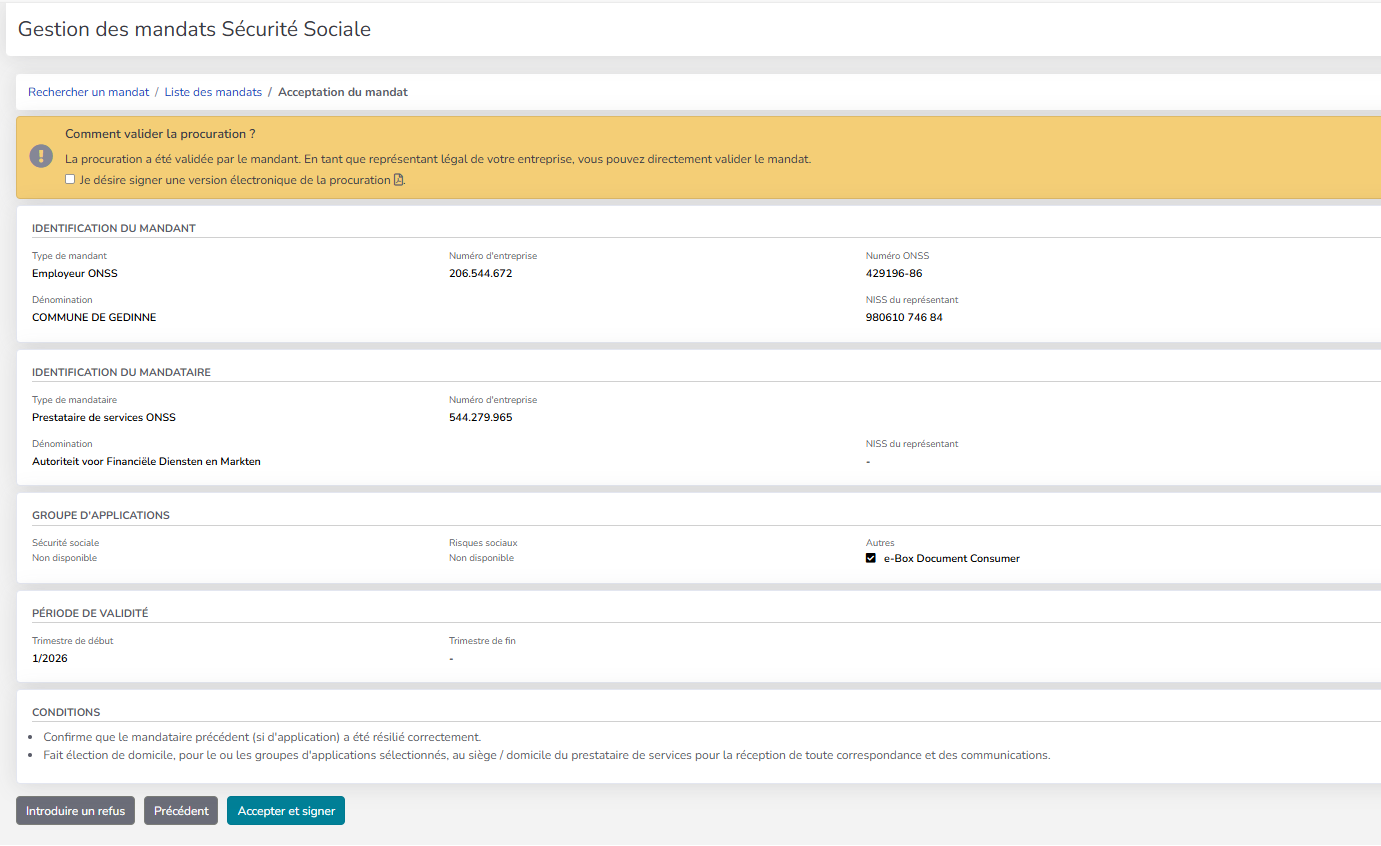
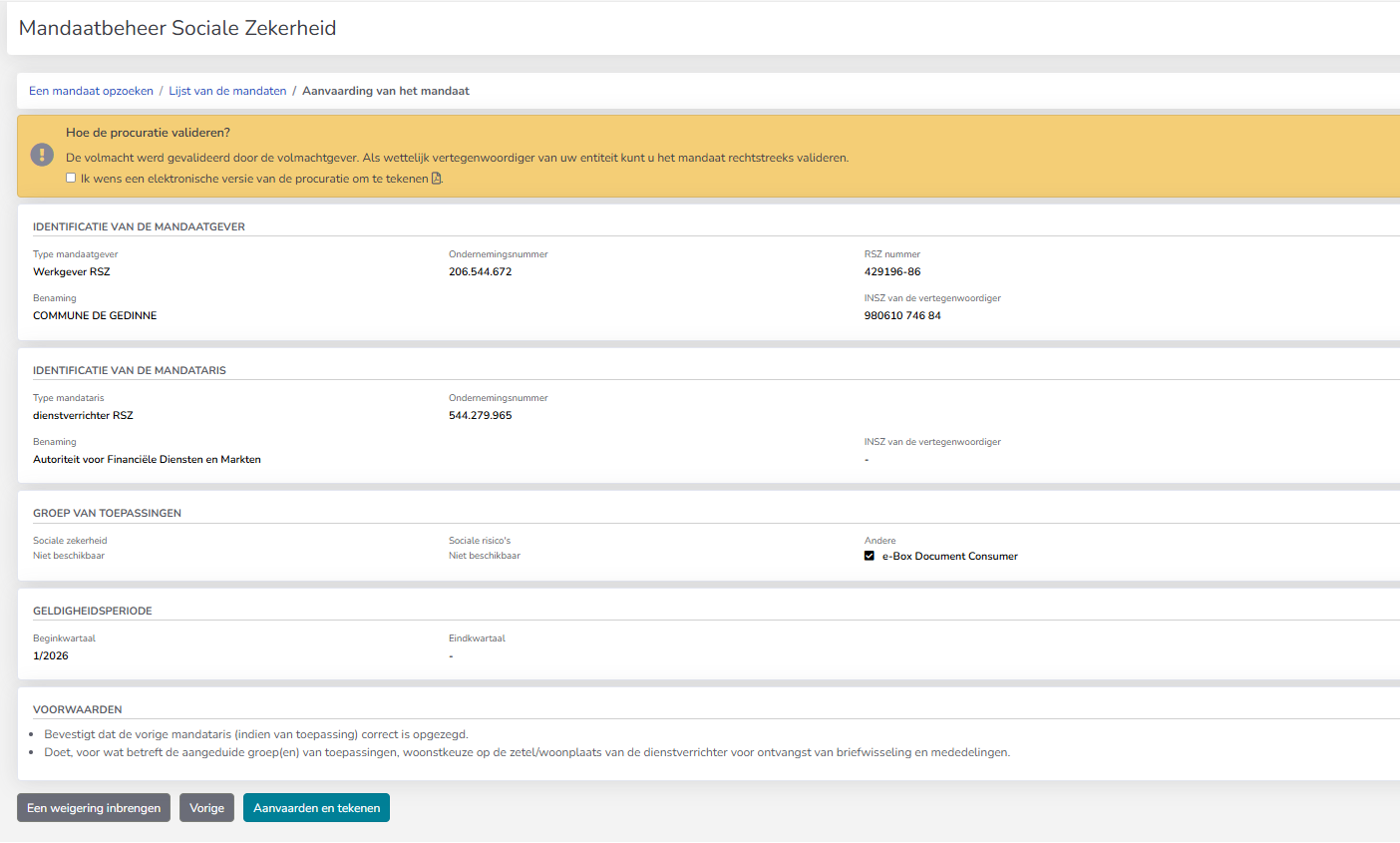
2) Validate the mandate with your Service Provider in the Mahis application.
- Connect to the Mahis application (as an "Employer");
- See the mandate in status "waiting":


- Validate the mandate
- As an employer (FR: qualité "Employeur ONSS"; NL: "Werkgever RSZ") , you must be "Legal Representative" or "Access manager" or you must have the following permission in your profile: FR: "MAHIS : signature d'un mandat" ; NL: "MAHIS : tekenen van een mandaat";
- 🛈 Please check that the mandate is linked to the Service Provider you want to work with (section FR "Identification du mandataire"; NL "Identificatie van de mandataris");
- Please check that the mandate concerns the application group "e-Box Document Consumer".
- Link to Mahis:
- Mahis user guide:
3) That's all !
Your Service Provider will manage all the the technical steps with Oauth and the e-Box API's. As a Document Consumer working with a Service Provider, you do not have to worry about all the technical integrations.